Buyer's Company Info
To access the Company Info page, admins can navigate to Preferences and select Company Info. Within this section, various details such as the company name, logo placement, legal address, country, city, postal code, registration number (which may include tax ID, DUNS, E-I-N, etc.), company URL, and default currency for spend files can be modified. Only users with admin access can modify company data
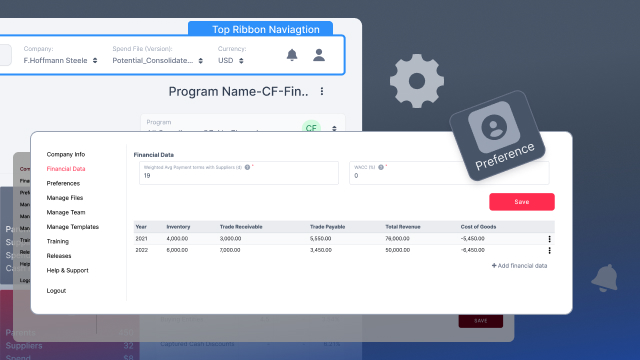
Financial Data Preferences in the ADA Platform
- The video introduces the financial data preferences option within the ADA Platform's settings.
- Administrators can utilize this feature to make specific adjustments related to the financial aspects of their company within the ADA Platform.
Payment Terms and Cost of Capital Customization
- Within the financial data section, administrators can customize the weighted average payment terms with suppliers specifically tailored for the ADA Platform.
- Adjustment options for the weighted average cost of capital are also available, providing tailored financial management within the context of the ADA Platform.
Key Metrics Adjustment for ADA Platform Evaluation
- Towards the bottom of the financial data preferences, administrators have the capability to make adjustments to key financial metrics crucial for the ADA Platform's evaluation.
- These key metrics include inventory, receivables, payables, revenue, and cost of goods sold, shaping how the company is assessed within the ADA Platform.
Impact on Buyer's Financials within ADA Platform
- Changes made in the financial data preferences have a direct impact on the buyer's financials within the ADA Platform.
- This implies that modifications to payment terms, cost of capital, and key metrics will influence how the company's financial health is perceived within the ADA Platform.
Global Effect on ADA Platform Metrics
- The adjustments made not only affect the buyer's financials but also have a broader impact on metrics throughout the entire ADA Platform.
- This global effect emphasizes the interconnectedness of financial data preferences and the comprehensive evaluation of the company within the ADA Platform.
Overall Influence on ADA Platform Form and Function
- The video concludes by highlighting that the changes made in the financial data preferences section extend beyond mere numerical adjustments, influencing the form and function of the ADA Platform.
- These modifications shape how the company is perceived and evaluated within the specific context of the ADA Platform in the realm of digital advertising.
0:01 - This is the company info page within the Preferences menu. To get here, you select Preferences Company Info. Once in here, you can change the name of your company.
0:16 - The logo, which would appear here on the top left. The legal address, country, city, postal code registration number or type of that, which could be tax ID, DUNS, EIN, etc.
0:31 - The URL of your company and the default currency that will be shown for this spend file.
Up next